Bluetooth Audio Utility
Windows 10, 11 · Version 1.0.0 · Free
See which codec your Bluetooth headphones are using.
Bluetooth Audio Utility is a native Windows app. It shows which codec your Bluetooth audio device is using, plus its bitrate, sample rate, latency and supported codecs.
Use it to troubleshoot wireless headphones or to force a particular codec. The app stays small, using less than 2.5 MB of resident memory.
- Platform
- Windows 10, Windows 11AAC needs 11
- Version
- 1.0.0
- Builds
- x64, ARM64
- Price
- Free
Windows on ARM: ARM64 installer
Administrator rights
The app reads the connection state, the codec in use and the device's supported codec list without elevated rights. Everything else comes from Bluetooth driver ETW events, and reading those needs administrator privileges. If you start the app unelevated, it offers to restart itself as an administrator. Without administrator rights, streaming state, bitrate, sample rate and latency stay empty, and codec configuration settings cannot be changed.
01
Start it as an administrator
To switch codecs on or off and see streaming state, bitrate and latency, answer Yes when the app asks at startup to restart itself as an administrator.
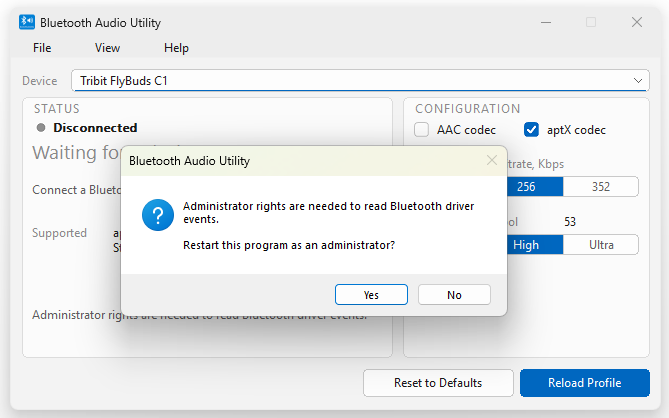
ReadingNo driver events · connection and codec in use still shown · streaming, bitrate and latency need elevation
02
The status panel
The left half of the window is measurement. The fields in it come from the Bluetooth driver on this PC. Here a Tribit FlyBuds C1 has just connected.
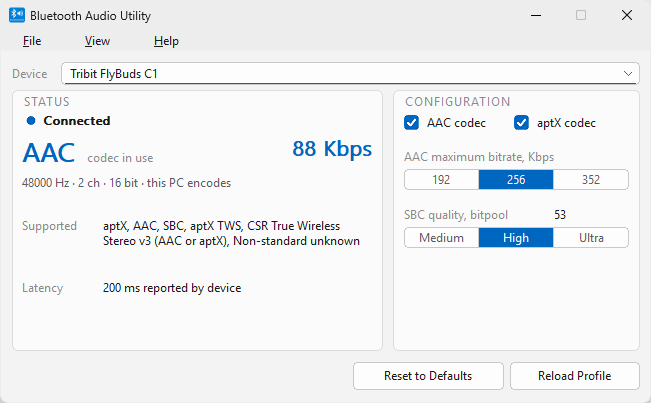
- Device
- The drop down across the top lets you select the device to query from every paired audio device on this PC.
- Connected
- Device state, under STATUS. It reads Disconnected, Connected or Streaming. Streaming means audio is playing through this device right now.
- AAC codec in use
- Indicates what Windows and Bluetooth device negotiated for audio transmission. Windows encodes audio using this codec.
- 88 Kbps
- The bitrate the Windows encoder reported for this stream. Here, the remote device is a generic Bluetooth dongle, so the bitrare is relatively low.
- 48000 Hz · 2 ch · 16 bit · this PC encodes
- Sample rate, channels, bit depth, and which layer does the encoding: this PC encodes (software), or Bluetooth radio encodes (hardware). On SBC this line starts with the bitpool.
- Supported
- Codecs advertised by the device during pairing. What Windows driver cannot use are marked (not supported by Windows).
- Latency
- The delay the device itself reports, in milliseconds. It is the device's claim, not a measured value.
ReadingTribit FlyBuds C1 · AAC · 48 000 Hz · 2 ch · 16 bit · 88 Kbps · 200 ms · this PC encodes
03
The configuration panel
The right half holds four controls. They write Windows A2DP driver settings to the registry. These are machine settings, so they apply to every user on this PC. Your changes take effect after you reload the profile.
- AAC codec
- Whether to offer AAC to remote devices.
- aptX codec
- Whether to offer aptX to remote devices.
- AAC maximum bitrate, Kbps
- The highest bitrate the driver's software AAC encoder may use. Default 256.
- SBC quality, bitpool
- Medium, High or Ultra, which set the maximum bitpool to 35, 53 or 76. The number beside the label shows the stored ceiling. A higher bitpool means a higher bitrate on the link.
Few devices support bitpool higher than 53.
- Reset to Defaults
- Sets all four settings back to what Windows ships with.
- Reload Profile
- Applies your changes. It reloads the Bluetooth audio profile and restarts the A2DP driver, which then reads the new settings. Until you press it, the changes are not in effect. Without this button you would need to restart the PC after each change.
StoredAAC codec on · aptX codec on · AAC ceiling 256 Kbps · SBC ceiling bitpool 53
04
The codec priority order
Windows walks the list below, takes the first codec that both ends support, and uses it to encode audio for Bluetooth transmission.
Windows makes the choice, so the app has no codec picker. You can switch a codec off, and Windows moves down the list. Windows does not support aptX HD, aptX Low Latency, LDAC or LHDC. When a device offers them, the app marks them in the Supported list. AAC encoding needs Windows 11, build 22000 or later. On Windows 10 the list starts at aptX.
Windows 11 supports aptX Adaptive on some hardware and ranks it above AAC.
05
Forcing aptX by switching AAC off
To move a device from AAC to aptX, clear the AAC codec checkbox. he device keeps using AAC until you reload the profile.
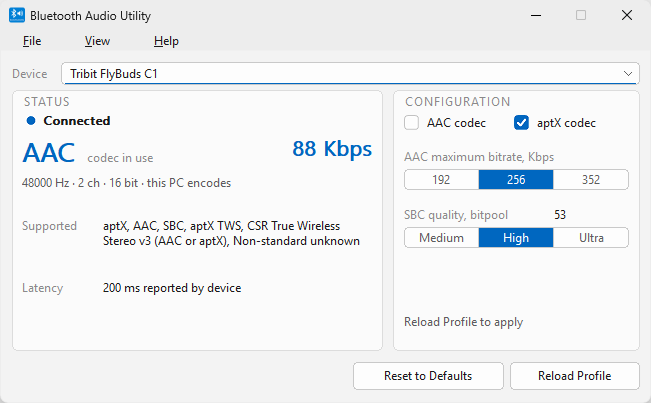
ReadingTribit FlyBuds C1 · still AAC · 88 Kbps · change stored, not applied
06
Reload the profile
Reload Profile disables and re-enables the A2DP sink for the selected device. The device disconnects and reconnects, which is what forces a fresh codec negotiation. Expect a short silence.
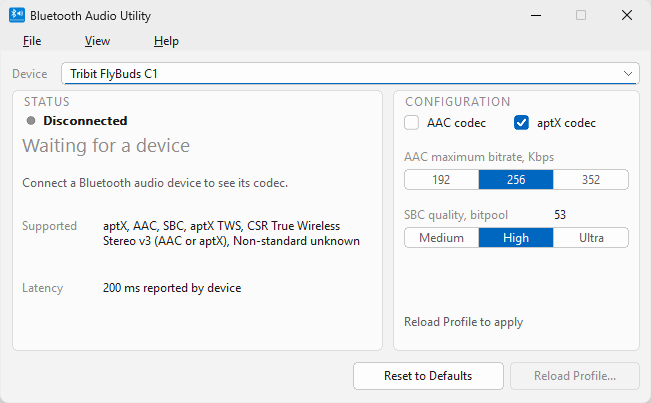
- Disconnected / Waiting for a device
- The device is disconnected for a moment.
- Reload Profile…
- The button greys out and gains an ellipsis while the reload runs, so a second click cannot start an overlapping one.
ReadingLink down · reload in progress · no codec negotiated yet
07
Confirm the new codec
The device comes back on aptX. Check the sample rate: aptX on Windows runs at 44 100 Hz, and AAC ran at 48 000 Hz.
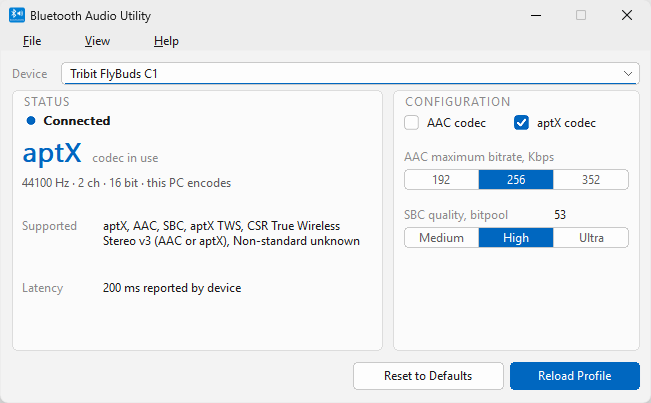
- aptX codec in use
- Negotiated on the new connection. The same spot read AAC before the reload.
- 44100 Hz · 2 ch · 16 bit
- 44 100 Hz now, against 48 000 Hz on AAC.
ReadingTribit FlyBuds C1 · aptX · 44 100 Hz · 2 ch · 16 bit · 200 ms · connected, idle
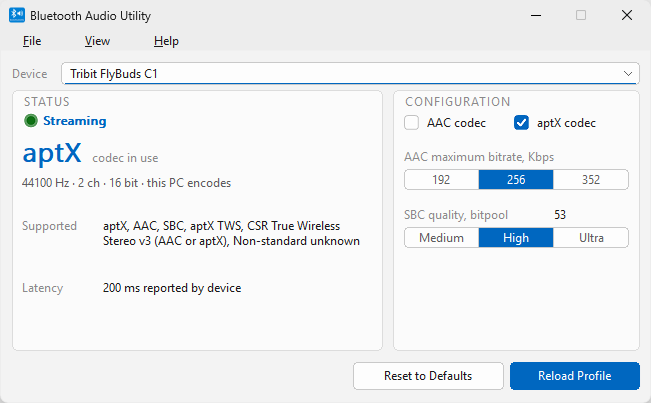
- Streaming
- Start playing and the state changes from Connected to Streaming.
Note: Windows does not report the bitrate for aptX.
ReadingTribit FlyBuds C1 · aptX · 44 100 Hz · 2 ch · 16 bit · 200 ms · streaming
08
Forcing SBC
Here is a Shanling MW200 with AAC and aptX both cleared. Windows walks past both and negotiates SBC. SBC is also the one codec whose quality you can set, through the bitpool.
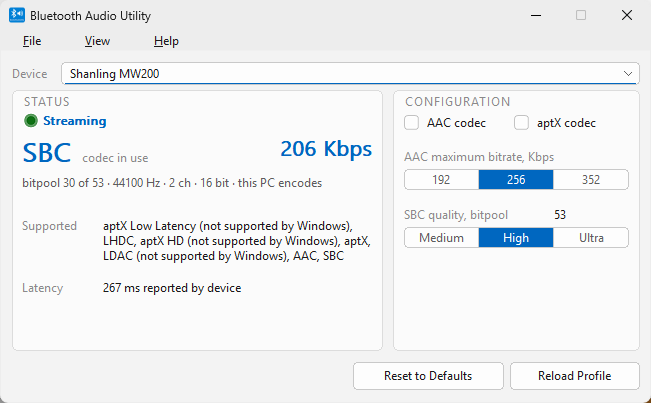
- AAC codec / aptX codec
- Both checkboxes are clear, so Windows offers neither codec.
- SBC codec in use
- The codec every A2DP device must support, which is why the list ends here.
- 206 Kbps
- The encoder reports this number, as it did for AAC.
- bitpool 30 of 53
- On SBC the detail line starts with the bitpool. The first number is the bitpool the link uses. The second is your ceiling from step 03. If the first number sits well below the second, the device or the radio conditions set the limit, and your setting does not.
- (not supported by Windows)
- This label appears several times in the Supported list. This device also offers aptX Low Latency, LHDC, aptX HD and LDAC. Windows supports none of them, and the app marks each one.
ReadingShanling MW200 · SBC · bitpool 30 of 53 · 44 100 Hz · 2 ch · 16 bit · 206 Kbps · 267 ms · streaming
09
aptX Adaptive needs specific PC hardware
The vivo TWS 3 below supports aptX Adaptive, but this PC and its generic Bluetooth dongle do not. The vivo TWS 3 does not list plain aptX among its supported codecs, so switching AAC off drops the link to SBC. The Supported list in the app shows this.
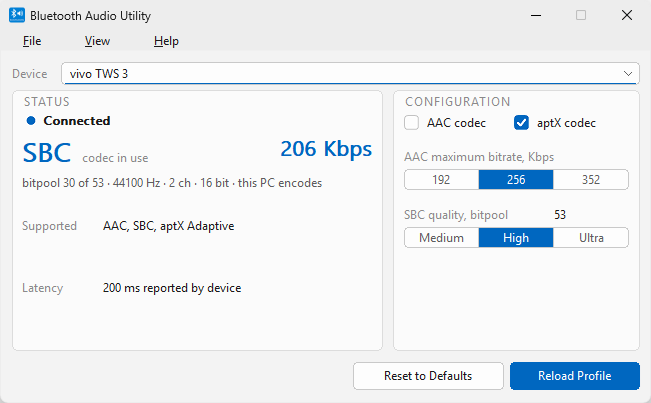
Readingvivo TWS 3 · SBC · bitpool 30 of 53 · 44 100 Hz · 2 ch · 16 bit · 206 Kbps · 200 ms · connected
Visual theming
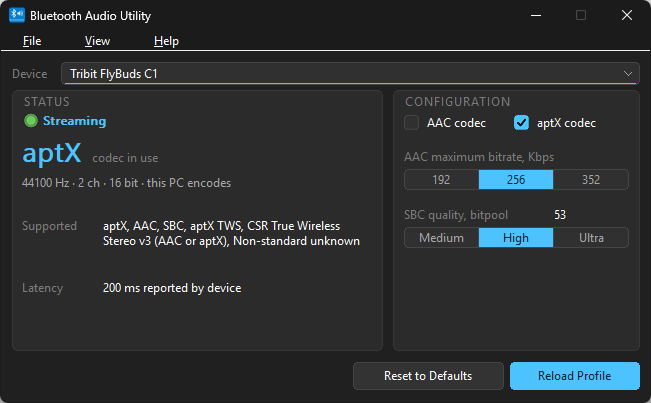
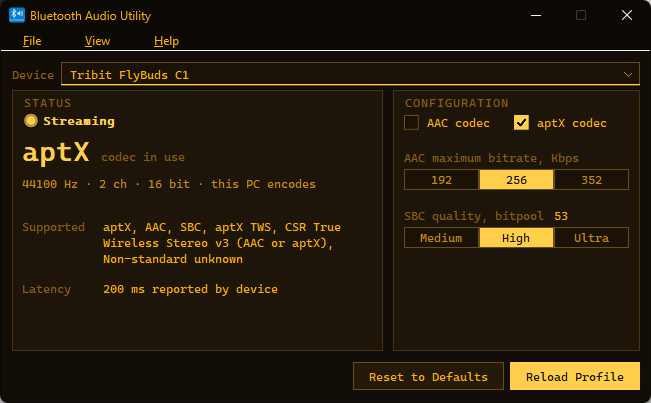
The app supports main window look customization under View > Theme. System follows the Windows light and dark setting. Light, Dark and Amber CRT are fixed. Below, the same device streams aptX in each of the three.
Configuration reference
Whatever you set here stays set until you change it or press Reset to Defaults.
| Control | Options | Default |
|---|---|---|
| AAC codec | on, off | on |
| aptX codec | on, off | on |
| AAC maximum bitrate | 192000, 256000, 352000 | 256000 |
| SBC quality, bitpool | Medium 35, High 53, Ultra 76 | 53 |
Machine wide
These settings belong to the driver, so they apply to every user and every paired device on this PC. Changing them needs elevation.
In the tray
View > Close to tray closes the app to the notification area. It then tells you when the codec changes, when a device disconnects, and when the SBC bitpool drops on a link that was running higher.
Diagnostics
Help > Collect diagnostic info shows you the report contents, then writes one file to your desktop. The report leaves out your user name, computer name and file paths. The app does not send the file anywhere; you decide who gets it.
Languages
English, French, Spanish, German and Italian, under View > Language. System default follows Windows.